Give us Hosts control of Backup-Code Communication-Switch
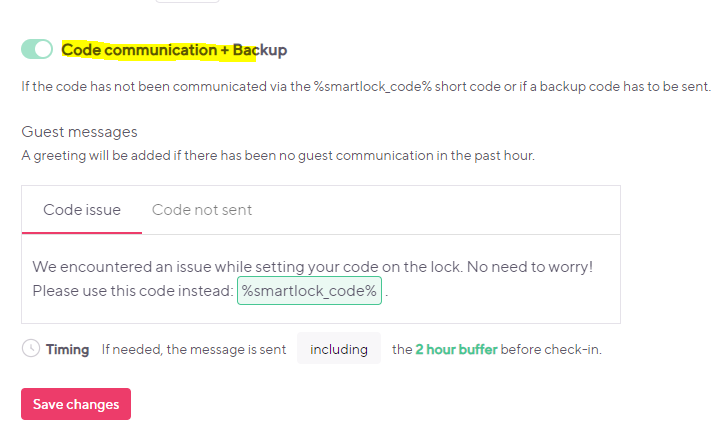
I can't switch this off, even if I don't want Hospitable to send it. Why this paternalism?
Sometimes it's nescessary to switch that feature off but I can't. 😢 We hosts should be in control of EVERY Message that we don't like. Even there is no extra development on it the switch already exists.
Log in to comment and vote
Comments8
Dec 23, 2025
PinnedIt’s now possible to completely turn code communication messages off. Let us know what you think. 🙌
https://help.hospitable.com/en/articles/7172908-how-does-smart-lock-code-communication-and-backup-codes-work
Moccasin Lily
May 8, 2025
I am writing in from Colombia, where it is a legal requirement to collect passports before giving access to the property. It's crazy to me that hospital will not allow me to delete or even modify a very confusing message. It also puts us at legal risk for losing the entire business if we get audited by the TRA as several guests now have gained access and not provided passports even after repeated followup. This is my number one pain point with hospitable and will explore switching platforms until this is fixed.
Moccasin River
Aug 8, 2024
Yes, i use the Yale Assure Smart Lock 2 to help with automation. However, I am very disappointed we cannot disable code communication backup as it does not allow us to properly vet last minute bookers. Particularly another case happened today. We had a same day booking (which we allow as it increases our revenue) but because this person did not add their pet and admitted it, I sent a message to let them know they need to do such. But because this code that sends as a backup is automatic, when I was specifically waiting to send all of the check in details, he now has access to the home when I did not want to give that message yet. This situation is not as bad as others, where airbnb may accept a booking automatically even with poor reviews and we are not comfortable hosting them so we would contact airbnb to get them to cancel the reservation , however with this smart lock code automation backup that i can’t disable, it sends them a code without our permission as we wait on the adminitstrative cancelation from Airbnb. Which is dangerous. And sure we can delete or change the code but then the backup automation will send them another backup code automatically that we cant disable and we dont want to give them access to the home before airbnb has time to cancel their reservation. Also, worse case, if it automatically sends and we are unable to go in within time and manually delete the code it sent, they have access to the home. I think this is very flawed on your end to not allow us to disable this. Not only that, it disrupts the flow of guest communication as we may be talking about something totally different then an automation comes in that just throws everything off. We have a nice perception of automated messages that doesn't make it seem so "automated" so when a code comes in and automatically sends that we dont have control over I find very disappointing and frustrating. I think this backup code automation should come at the users discretion not be a sole decision of someone not in our business operations. It can create major safety concerns as well when we may not want to give someone access to the home if they are not a good fit and vetted by us properly if the OTA automatically accepted them and made a mistake, which happens a lot. If there is anyway to disable this feature, that would be great. If not, I highly recommend some changes to this. Its the most concerning safety feature that is out of our control through hospitable. If some angry guests wants to retaliate because we canceled their reservation after we vetted them, they now have a code that you sent to them without our permission. Could even be a liability. I can assure you we add the code to messages before 3 PM but if someone books same day after three PM, this automated message that is out of our control just comes in. Ruins the flow of communication as we wont even be talking about that nor do we want it sent right away if we havent vetted them. Our automated message that would usually send before 3 PM is still automatically scheduled for 20-30 minutes after someone books so there still should be no excuse as why this cant be disabled. as the message with their code is still scheduled to be sent, but we can delay or pause that one if we need to. This automated message defaults to sending before that one as well. I really wish we could disable this code from sending automatically without our permission. it frustrates me because it ruins our guest communication and the appearance of us not using automation. It also is, like a said, a major safety concern.
This is super flawed and annoying. I do not believe hostpiable should be making this operational decision on behalf of owners. It really screws up automation perception of the guests, I hate them thinking all of its automated, not to mention the security concerns i laid out. I see how this COULD be beneficial in some scenerios but in our operations we have teams monitoring messaging and would never happen with someone forgetting the code to be sent. no matter how late. Not to mention we ALREADY have an automated message scheduled for last minute bookings that will send out 30 minutes after accepting, so there is NO reason this message should send. I hope you take my feedback and develop a way to turn this off.
**Its very frustrating how we have no control over this message, whether with content (which you would think we would at least be able to change), or most importantly the ability to turn it off as an operational decision because of the possibility (and quite high possibility) of it causing more harm in our operations then good. Out of the MANY times this message has sent out, because we get last minute bookings a lot (with this account and another business account we have 3 listings under), not one time has this code actually been beneficial and useful. As the code was sent either manually or through our other automated message, yet this sent anyway. Its literally only caused frustration and annoyance from us, the consumer. I please advise you guys to fix this issue. Change to where the BUSINESS and Consumer can make the operational decision on the "Automated Backup Code Message" that sends if it recognizes it has not been sent. I personally would leave the error automation on, as that is important. But the automated one if it hasn’t been sent by check-in time has only caused frustration and never has actually been useful. I can asusure you I understand why it has sent in the past to guests (and it has met the needed criteria for when it "Should send", thats not the issue), i just do not agree with it doing so as it has never been useful and necessary, so I wish I could disable it.
Magenta Sun
Jul 15, 2024
This is crucial for us too. If there is a problem setting the lock code, I will fix it myself to maintain the users phone number as the entry code, not some random number. Using a random number is a horrible guest experience and we don’t want to be forced to do this. We don’t want hospitable to take over control of the messaging sent to guests, this affects our guest experience.
There seems to be the notion that automation means we don’t want to be bothered with any of this. We as hosts are ultimately responsible for guests experience, and are deeply involved in the check-in checkout process. We freaking need to manage cleaning and restocking the home every guest change, setting the lock code is not that big a deal in the case that hospitable fails to do so. Automatic lock codes are a convenience, not a necessity. We’ve lived with manually setting the lock code before hospitable just fine.
Twice, we’ve also had erroneous messages from hospitable sent to guests that did not actually fail to set the lock code. In the event of a mistaken error, this is CONFUSING to guests and has required us to backtrack with the guest saying, “no actually ignore that message your lock code will work just fine.”
Just allow us to turn OFF this message!!!! This makes us so angry.
Hospitabase
Apr 3, 2024
You still have full control of your codes and messaging. The message will not go out if a code has been communicated via the %smartlock_code% short code, unless a backup code has to be sent.
If you want to delay sending the code you can:
Change the check-in time, see here.
Change the code time, see here.
If you want to stop sending a code you can:
Cancel the reservation.
Delete the code from your lock app. When this is done we will not recreate the code or trigger a backup code.
Coral Cucumber
Apr 3, 2024
I'm sorry, but that's not as easy as you write. Please take a look at the real use cases:
When editing code in the automated messages, then Hospitable will send the alert for forgotten code message anyway - even if I don't want it.
Delaying the code by changing check-in/check-out times does not fulfill the needs if we hosts upsell one more day to the guest directly (when it was booked via Airbnb Booking or VRBO). There is no solution for that because Hospitable doesn't let me edit the date of the code. So I have to make an extra code manually for the guest extra days. But if the guest comes 3 days earlier (sold direct without Airbnb because of the fee), Hospitable will send the backup code or the alert message to the guest anyway in the middle of the stay and doesn't know about the guest's code that is needed for the extra days (which should be the same code that is automatically set, but I can't extend days earlier to the lock). I have this really often and I get no solution for this problem.
"Cancel the reservation" would solve it, okay, but that is not meant to be cool if I don't want to solve the key message problem just by canceling the guest 😅😅
"Delete the code from the native lock app" would not go with your philosophy, don't leave the platform. If there is an easy way for you to not leave me the platform, why don't you integrate?
Sorry, but there are two possible ways:
Give us control of the button that is already there (0 engineering time, more control for me, your customer). It should be my decision.
And give us control over the date editing of a code, not only the time, please ❤️
Hospitabase
Apr 3, 2024
Happy to address these points.
When editing code in the automated messages, then Hospitable will send the alert for forgotten code message anyway - even if I don't want it.
The code communication will only be sent if the short code isn't included in the message. The short code must be used or we can't be sure the correct code was sent if we have to revert to a backup code. The code itself should not be edited within a message.
Delaying the code by changing check-in/check-out times does not fulfill the needs if we hosts upsell one more day to the guest directly (when it was booked via Airbnb Booking or VRBO). There is no solution for that because Hospitable doesn't let me edit the date of the code. So I have to make an extra code manually for the guest extra days. But if the guest comes 3 days earlier (sold direct without Airbnb because of the fee), Hospitable will send the backup code or the alert message to the guest anyway in the middle of the stay and doesn't know about the guest's code that is needed for the extra days (which should be the same code that is automatically set, but I can't extend days earlier to the lock). I have this really often and I get no solution for this problem.
If you upsell a day and extend the reservation, then the code timing is automatically updated. You don't need to edit the code dates or create a new code.
"Cancel the reservation" would solve it, okay, but that is not meant to be cool if I don't want to solve the key message problem just by canceling the guest 😅😅
The reason I mention this is because ultimately if you're going to withhold a door code and not allow a guest who has paid to enter the property, and you can't push the check-in time back any further, you will probably need to cancel.
"Delete the code from the native lock app" would not go with your philosophy, don't leave the platform. If there is an easy way for you to not leave me the platform, why don't you integrate?
Apologies I mistyped, we do allow deletion of reservation codes from within the device dashboard. So you can do that from within our platform.
Coral Cucumber
Apr 4, 2024
I'm so sorry, but you just don't get the usecase, every host has. You can read it in this obvious missunderstanding part:
You wrote: "If you upsell a day and extend the reservation, then the code timing is automatically updated. You don't need to edit the code dates or create a new code."
That's wrong in the context I wrote several times:
I want to upsell few days direct to a guest that
has booked via AIRBNB, so
Hospitable can't extend the booking because it's made by airbnb and
so the code cannot be changed by date manually is a big problem. because it's unpossible to extend the booking manually - without airbnb fee.
The solution to delete the code is a workarround, not a solution. because then I have to leave the plattform for of a new code (and forget that it is set in another plattform) - instead of you let me edit the date in the SM dashboard.